![OPI_with_Tag_RGB_300dpi_3in_tall-1.png]](https://knowledge.opisystems.com/hs-fs/hubfs/OPI_with_Tag_RGB_300dpi_3in_tall-1.png?height=50&name=OPI_with_Tag_RGB_300dpi_3in_tall-1.png)
Although there are various methods to find a gateway’s IP address, we are going to explore the 2 most common.
- Local router DHCP List
- Within the router’s DHCP list look for the IP address assigned to the gateway’s Mac Address, which is as follows:
00:1C:2C:GATEWAY_MAC_ADDRESS- GATEWAY_MAC_ADDRESS: last 6 hexadecimal characters with which the gateway has been registered onto the OPIBLUE account (as an example see the attached image)
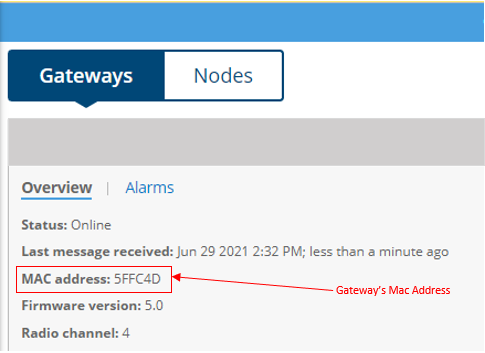
- GATEWAY_MAC_ADDRESS: last 6 hexadecimal characters with which the gateway has been registered onto the OPIBLUE account (as an example see the attached image)
- Within the router’s DHCP list look for the IP address assigned to the gateway’s Mac Address, which is as follows:
- Using any of the networking tools (e.g., command line, Fing, etc..) list the active devices and search for the IP Address assigned to the gateway’s Mac address:
00:1C:2C:GATEWAY_MAC_ADDRESS